Workstations for Visualization
Sandia Computers builds visualization workstations engineered to eliminate the bottlenecks that slow 3D production down—delivering stable performance for high-poly models, complex lighting, and large-scale scenes used in architectural visualization, product design, engineering, and VR development. Each system is configured for fast rendering, smooth scene interaction, and consistent responsiveness during iteration, so your workflow stays efficient from concept to final output without lag, crashes, or delays affecting production.
- 29+ Years in Business
- 4.6/5 Customer Satisfaction Rating
- Lifetime Free U.S. Support
- 1,000+ Custom PCs, Workstations, and Servers Built in New Mexico
High-Performance Visualization Workstations for Real-Time Rendering and 3D Visualization
Real-time visualization performance is typically driven by a powerful GPU paired with a high-frequency CPU to ensure smooth viewport interaction, fast scene updates, and responsive design work. The GPU handles most rendering and display workloads, while the CPU must be fast enough to avoid bottlenecks during modeling, simulation, and interactive design—making this configuration ideal for architecture, CAD, and real-time 3D visualization.
For rendering-focused visualization workflows, system design depends on the engine: GPU rendering delivers faster overall output for most production pipelines, while CPU rendering can handle larger, more complex scenes by leveraging system memory beyond VRAM limitations. Some workflows benefit from high-core-count CPUs, while others scale better with multi-GPU configurations depending on rendering engine and scene complexity.
Every Sandia visualization workstation is configured around these real-world performance patterns to deliver faster rendering, smoother real-time interaction, and stable performance across demanding engineering and design applications.
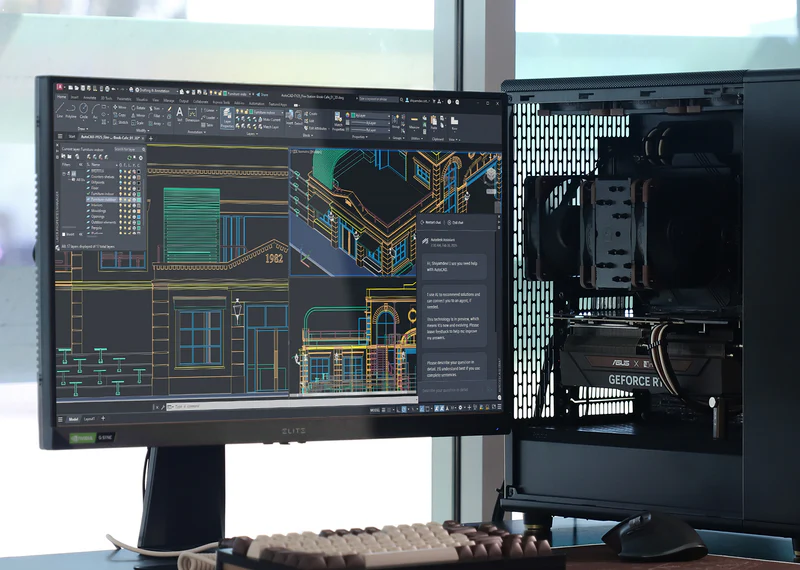
Software We Optimize For
We optimize visualization workstations for the software listed below, with each system tuned to match how those applications actually perform under real production workloads—balancing GPU, CPU, and memory for smooth real-time visualization and faster rendering. If your software isn’t listed or your workflow is more complex, we can design a custom visualization workstation built around your specific performance requirements.

Enscape

Keyshot

Lumion

Twinmotion
Why Choose Sandia Computers for Your Visualization workstation?
We don’t build generic systems—we design high-performance visualization workstations for engineering, architectural, CAD, and real-time 3D workflows based on how your software actually performs under production load.
- Built for real visualization workloads, not benchmarks
Tuned for real-world performance in CAD, architectural visualization, engineering design, and interactive 3D environments where stability matters more than peak numbers. - Smooth real-time 3D performance
Optimized GPU + CPU balance for responsive viewport interaction, fast scene updates, and lag-free design work in complex models. - Engineered for large, complex projects
Handles high-poly models, heavy textures, and detailed environments without slowing down or stuttering during active design. - Faster, more predictable rendering performance
Configured for both GPU and CPU rendering pipelines to reduce render times and improve consistency across projects. - Eliminates common bottlenecks
Balanced memory, storage, CPU, and GPU configuration to prevent slowdowns during simulation, rendering, and design iteration. - Built around your workflow, not a template
Every system is configured based on your actual software, file sizes, and production demands—not generic “recommended specs.” - Real support from people who understand your work
Direct, knowledgeable support when you need it—focused on solving real production issues quickly.
Result: a visualization workstation that stays responsive under pressure, renders faster when it matters, and keeps your workflow moving without hardware limitations slowing you down.
Talk to an Expert
If you don’t see your system listed under what we build, need tech support, have a custom request, or just aren’t sure what you need, just tell us below. We’ll take the time to understand exactly what you’re trying to do, what software or tasks you’re working with, and what you want your system to accomplish. From there, we’ll guide you to the right solution and make sure everything is built or set up correctly for your needs.
Whether it’s a full custom system, an upgrade to improve speed and performance, storage expansion, server or workstation setup, or help getting your current system running the way it should, we’ll handle it from start to finish. Our goal is to make the process simple, clear, and stress-free while making sure you get a system that performs reliably and does exactly what you need it to do without confusion or guesswork.
Trusted by organizations across New Mexico and the U.S.









Trusted by organizations across New Mexico and the U.S.